在看这篇文章之前推荐先看另一篇 BIO、NIO和AIO模型文章。
一、Reactor设计模式
Reactor中文含义反应堆,Reactor设计模式本质是基于事件驱动的,在Reactor设计模式中,存在如下几个角色:
- Handle(事件)出现的一种情况,比如当Socket管道有连接建立,或者有数据可读,那么此时就称作事件发生。
- EventHandler(事件处理器):用于处理不同类型的事件,EventHandler是一个抽象概念。
- Concrete Event Handler(具体事件处理器):是EventHandler的具体实现。
- Initiation Dispatcher(事件分发器):将事件分发到正确的事件处理器上进行处理。
- Synchronous Event Demultiplexer(事件多路分解器):用于监听事件并得到所有发生事件的集合。
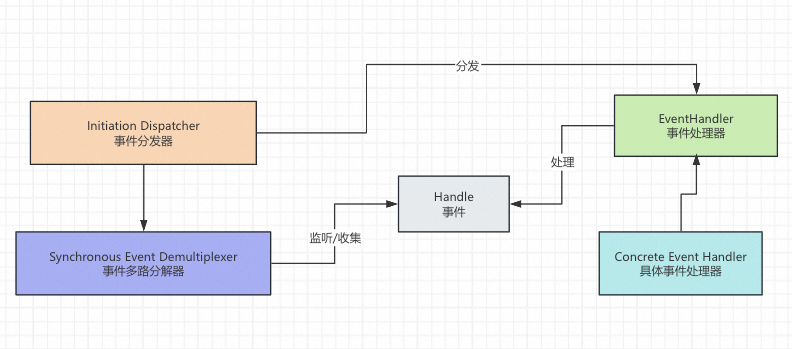
Reactor设计模式中的Reactor可以理解为上述图中的事件分发器+事件多路分解器,Reactor模型分为:单Reactor单线程模型,单Reactor多线程模型和主从Reactor多线程模型,Reactor模型虽然分为3种模型,但是其本质就是NIO的实现,是不过套了Reactor设计模式的外壳。
二、单Reactor单线程模型
单Reactor单线程模型中,只有一个Reactor在监听事件和分发事件,并且监听事件,分发事件、处理事件都在单Reactor中一个线程中完成: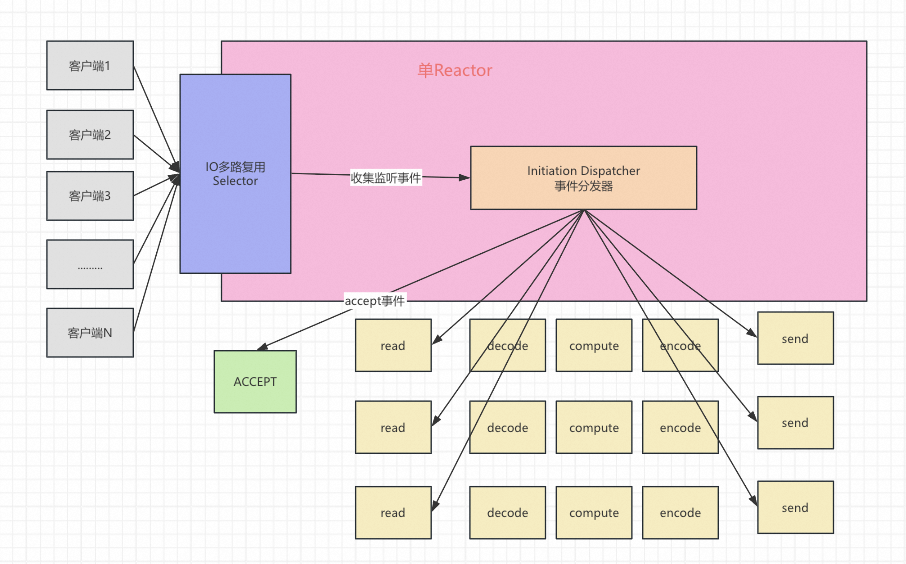
基于Java语言,实现一个简单的单Reactor单线程模型的服务端,整体代码实现完全符合上述示意图,大家可以进行参照阅读:
public class SingleThreadReactor implements Runnable {
    private Selector selector;
    public SingleThreadReactor(int port) throws IOException {
        // 服务端创建listen-socket管道
        ServerSocketChannel listenSocketChannel = ServerSocketChannel.open();
        // 绑定端口
        listenSocketChannel.socket().bind(new InetSocketAddress(port));
        // 设置为非阻塞模式
        listenSocketChannel.configureBlocking(false);
        // 打开Selector处理Channel,即创建epoll
        selector = Selector.open();
        // 把ServerSocketChannel注册到selector上,并且selector对客户端accept连接操作感兴趣
        listenSocketChannel.register(selector, SelectionKey.OP_ACCEPT);
    }

    @Override
    public void run() {
        while (!Thread.interrupted()) {
            try {
                // 获取发生的事件
                selector.select();
                Set<SelectionKey> selectionKeys = selector.selectedKeys();
                Iterator<SelectionKey> iterable = selectionKeys.iterator();
                while (iterable.hasNext()) {
                    // 对事件进行分发
                    dispatch(iterable.next());
                    //从事件集合里删除本次处理的key,防止下次重复处理
                    iterable.remove();
                }
            } catch (IOException e) {
                e.printStackTrace();
            }
            LockSupport.parkNanos(1000 * 1000 * 1000);
        }
    }

    /**
     * 分发事件
     * @param selectionKey
     */
    private void dispatch(SelectionKey selectionKey) throws IOException {
        if (selectionKey.isAcceptable()) {
            System.out.println("----->客户端连接事件<-------");
            ServerSocketChannel server = (ServerSocketChannel) selectionKey.channel();
            SocketChannel socketChannel = server.accept();
            socketChannel.configureBlocking(false);
            // 这里只注册了读事件,如果需要给客户端发送数据可以注册写事件
            socketChannel.register(selector, SelectionKey.OP_READ);
        } else if (selectionKey.isReadable()) {  // 如果是OP_READ事件,则进行读取和打印
            System.out.println("----->客户端读取事件<-------");
            SocketChannel socketChannel = (SocketChannel) selectionKey.channel();
            ByteBuffer byteBuffer = ByteBuffer.allocate(128);
            int len = socketChannel.read(byteBuffer);
            // 如果有数据,把数据打印出来
            if (len > 0) {
                System.out.println("----->接收到消息:" + new String(byteBuffer.array()));
            } else if (len == -1) { // 如果客户端断开连接,关闭Socket
                System.out.println("----->客户端断开连接<-------");
		socketChannel.close();
            }
        }
    }
}
然后编写一个主程序将Reactor运行起来:
public class ReactorServer {
    public static void main(String[] args) throws IOException {
        Thread reactorThread = new Thread(new SingleThreadReactor(8080));
        reactorThread.start();
    }
}
通过代码有没有发现,事件的监听、分发和处理都是在一个线程中做的。现在来思考一下单Reactor单线程模型有什么缺点。缺点是只有一个线程在工作,处理效率低,无法利用多核CPU的优势。但是尽管单Reactor单线程模型有上述的缺点,但是著名的缓存中间件Redis的服务端,就是使用的单Reactor单线程模型,因为Redis的操作都在内存中,读写都非常快速,所以单Reactor单线程模型也能运行得很流畅,同时还避免了多线程下的各种并发问题。也就是所redis的业务处理是非常快的。那如果业务处理慢怎么办。这个时候要请出我们的单Reactor多线程模型
三、单Reactor多线程模型
单Reactor多线程模型相比单Reactor单线程模型主要将业务处理交给多线程也就是线程池异步处理: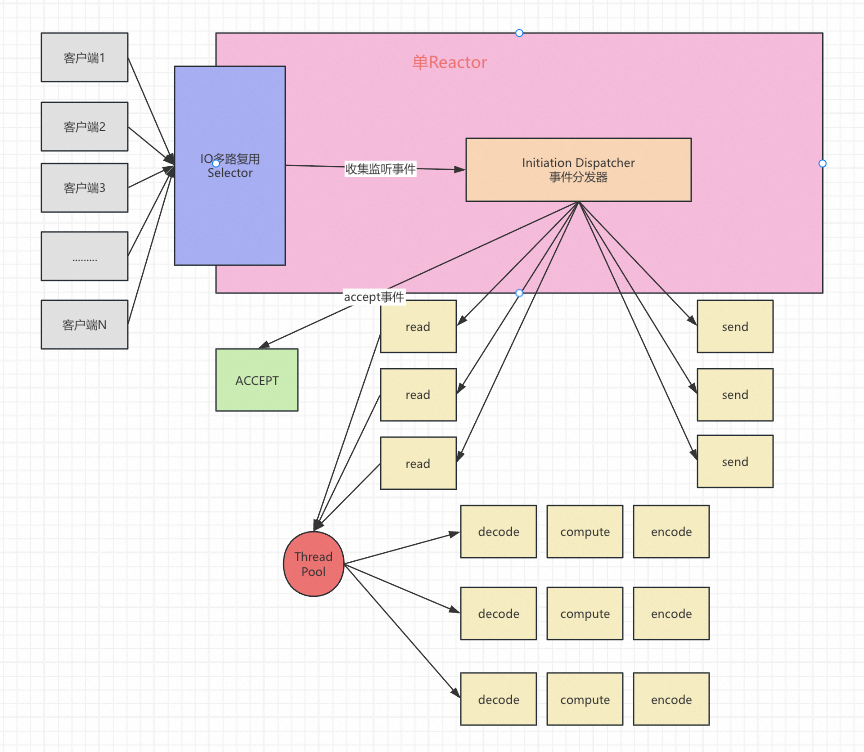
基于Java语言,实现一个简单的单Reactor多线程模型的服务端,整体代码实现完全符合上述示意图,大家可以进行参照阅读:
public class MultiThreadReactor implements Runnable {
    public static final ThreadPoolExecutor threadPool = new ThreadPoolExecutor(16, 32, 60, TimeUnit.SECONDS, new LinkedBlockingQueue<>(200));
    private Selector selector;

    public MultiThreadReactor(int port) throws IOException {
        // 服务端创建listen-socket管道
        ServerSocketChannel listenSocketChannel = ServerSocketChannel.open();
        // 绑定端口
        listenSocketChannel.socket().bind(new InetSocketAddress(port));
        // 设置为非阻塞模式
        listenSocketChannel.configureBlocking(false);
        // 打开Selector处理Channel,即创建epoll
        selector = Selector.open();
        // 把ServerSocketChannel注册到selector上,并且selector对客户端accept连接操作感兴趣
        listenSocketChannel.register(selector, SelectionKey.OP_ACCEPT);
    }

    @Override
    public void run() {
        while (!Thread.interrupted()) {
            try {
                // 获取发生的事件
                selector.select();
                Set<SelectionKey> selectionKeys = selector.selectedKeys();
                Iterator<SelectionKey> iterable = selectionKeys.iterator();
                while (iterable.hasNext()) {
                    // 对事件进行分发
                    dispatch(iterable.next());
                    //从事件集合里删除本次处理的key,防止下次重复处理
                    iterable.remove();
                }
            } catch (IOException e) {
                e.printStackTrace();
            }
            LockSupport.parkNanos(1000 * 1000 * 1000);
        }
    }

    /**
     * 分发事件
     *
     * @param selectionKey
     */
    private void dispatch(SelectionKey selectionKey) throws IOException {
        try {
            if (selectionKey.isAcceptable()) {
                System.out.println("----->客户端连接事件<-------");
                ServerSocketChannel server = (ServerSocketChannel) selectionKey.channel();
                SocketChannel socketChannel = server.accept();
                socketChannel.configureBlocking(false);
                // 这里只注册了读事件,如果需要给客户端发送数据可以注册写事件
                socketChannel.register(selector, SelectionKey.OP_READ);
            } else if (selectionKey.isReadable()) {  // 如果是OP_READ事件,则进行读取和打印
                System.out.println("----->客户端读取事件<-------");
                SocketChannel socketChannel = (SocketChannel) selectionKey.channel();
                ByteBuffer byteBuffer = ByteBuffer.allocate(128);
                int len = socketChannel.read(byteBuffer);
                // 如果有数据,把数据打印出来
                if (len > 0) {
                    threadPool.submit(() -> {
                        // 多线程业务处理
                        System.out.println("----->接收到消息:" + new String(byteBuffer.array()));
                    });
                } else if (len == -1) { // 如果客户端断开连接,关闭Socket
                    System.out.println("----->客户端断开连接<-------");
                    socketChannel.close();
                }
            }
        } catch (IOException e) {
            throw new RuntimeException(e);
        }


    }
}
然后编写一个主程序将Reactor运行起来:
public class ReactorServer {
    public static void main(String[] args) throws IOException {
        Thread reactorThread = new Thread(new SingleThreadReactor(8080));
        reactorThread.start();
    }
}
通过代码有没有发现,事件的监听、分发在一个线程中做的。但是事件处理是交由线程池的线程处理。单Reactor多线程模型虽然解决了只有一个线程的问题,但是可以发现,仍旧是只有一个Reactor在同时监听ACCEPT事件和READ事件,通常客户端连接的建立是不频繁的,但是连接建立后数据的收发是频繁的,所以如果能够将监听READ事件这个动作拆分出来,让多个子Reactor来监听READ事件,而原来的主Reactor只监听ACCEPT事件,那么整体的效率,是不是又进一步提升,这就是主从Reactor多线程模型。
四、主从Reactor多线程模型
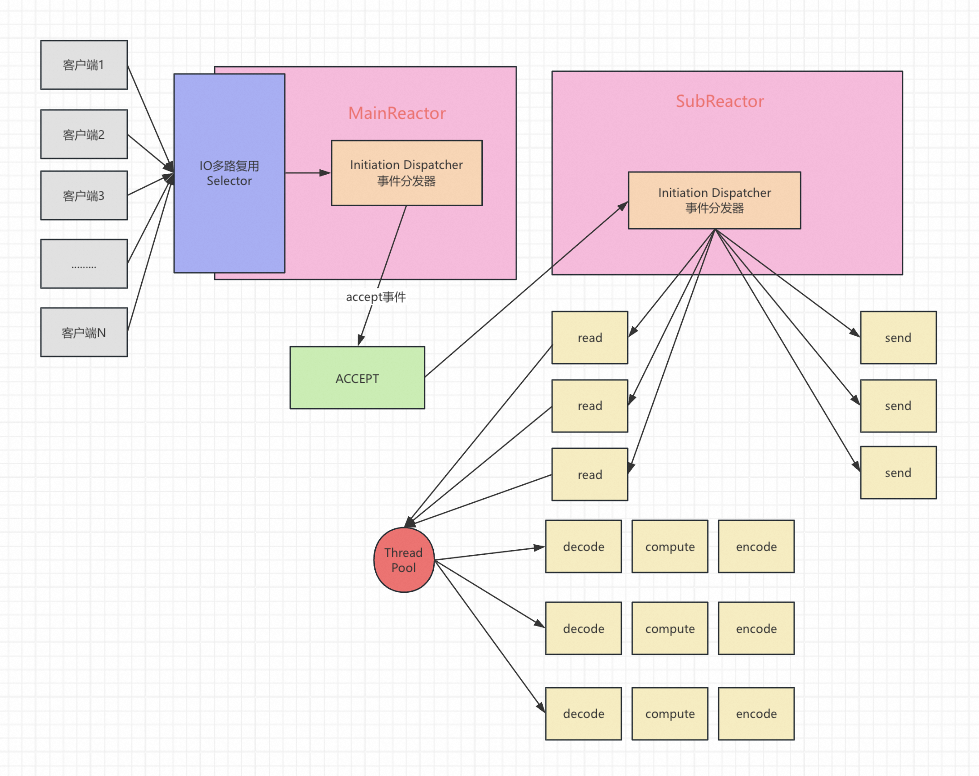
基于Java语言,实现一个简单的单Reactor多线程模型的服务端,整体代码实现完全符合上述示意图,大家可以进行参照阅读:
public class MainReactor implements Runnable {

    private final Selector selector;

    public MainReactor(int port) throws IOException {
        // 开多路复用器
        selector = Selector.open();
        // 服务端创建listen-socket管道
        ServerSocketChannel listenSocketChannel = ServerSocketChannel.open();
        // 设置为非阻塞
        listenSocketChannel.configureBlocking(false);
        // 绑定监听端口
        listenSocketChannel.socket().bind(new InetSocketAddress(port));
        // 将listen-socket管道绑定到主Reactor的多路复用器上
        // 并且主Reactor上只会注册listen-socket管道,用于监听ACCEPT事件
        listenSocketChannel.register(selector, SelectionKey.OP_ACCEPT,
                new Acceptor(listenSocketChannel));
    }

    @Override
    public void run() {
        while (!Thread.interrupted()) {
            try {
                selector.select();
                Set<SelectionKey> selectionKeys = selector.selectedKeys();
                Iterator<SelectionKey> iterable = selectionKeys.iterator();
                while (iterable.hasNext()) {
                    // 对事件进行分发
                    dispatch(iterable.next());
                    iterable.remove();
                }
            } catch (IOException e) {
                e.printStackTrace();
            }
            LockSupport.parkNanos(1000 * 1000 * 1000);
        }
    }

    private void dispatch(SelectionKey selectionKey) {
        // 获取事件附加器,只会是Acceptor
        Runnable attachment = (Runnable) selectionKey.attachment();
        if (attachment != null) {
            attachment.run();
        }
    }

}
Acceptor主要用于处理accept事件,并将读事件注册从Reactor
public class Acceptor implements Runnable {

    // 指定从SuReactor一共有16个
    private static final int TOTAL_SUBREACTOR_NUM = 16;

    // 服务端的listen-socket管道
    private final ServerSocketChannel listenSocketChannel;

    // 用于运行从SuReactor
    private final ThreadPoolExecutor threadPool = new ThreadPoolExecutor(
            TOTAL_SUBREACTOR_NUM, TOTAL_SUBREACTOR_NUM * 2,
            60, TimeUnit.SECONDS, new LinkedBlockingQueue<>(200));

    // 从Reactor集合
    private final List<SubReactor> subReactors = new ArrayList<>(TOTAL_SUBREACTOR_NUM);

    public Acceptor(ServerSocketChannel listenSocketChannel) throws IOException {
        this.listenSocketChannel = listenSocketChannel;
        // 将从Reactor初始化出来并运行
        for (int i = 0; i < TOTAL_SUBREACTOR_NUM; i++) {
            SubReactor subReactor = new SubReactor(Selector.open());
            subReactors.add(subReactor);
            threadPool.execute(subReactor);
        }
    }

    @Override
    public void run() {
        try {
            // 为连接的客户端创建client-socket管道
            SocketChannel clientSocketChannel = listenSocketChannel.accept();
            // 设置为非阻塞
            clientSocketChannel.configureBlocking(false);
            // 任意选择一个从Reactor,让其监听连接的客户端的READ事件
            Optional<SubReactor> anySubReactor = subReactors.stream().findAny();
            if (anySubReactor.isPresent()) {
                SubReactor subReactor = anySubReactor.get();
                // 从Reactor的多路复用器会阻塞在select()方法上
                // 这里需要先唤醒多路复用器,立即从select()方法返回
                subReactor.getSelector().wakeup();
                // 让从Reactor负责处理客户端的READ事件
                clientSocketChannel.register(subReactor.getSelector(), SelectionKey.OP_READ,
                        new Handler(clientSocketChannel));
            }
        } catch (IOException e) {
            e.printStackTrace();
        }
    }

}
SubReactor:从Reactor主要接收在主Reactor链接后Selector并分发读事件:
public class SubReactor implements Runnable {

    private final Selector selector;

    public SubReactor(Selector selector) {
        this.selector = selector;
    }

    @Override
    public void run() {
        while (!Thread.interrupted()) {
            try {
                selector.select();
                Set<SelectionKey> selectionKeys = selector.selectedKeys();
                Iterator<SelectionKey> iterator = selectionKeys.iterator();
                while (iterator.hasNext()) {
                    // 对事件进行分发
                    dispatch(iterator.next());
                    iterator.remove();
                }
            } catch (IOException e) {
                e.printStackTrace();
            }
            LockSupport.parkNanos(1000 * 1000 * 1000);
        }
    }

    private void dispatch(SelectionKey selectionKey) {
        // 获取事件附加器,只会是Handler
        Runnable runnable = (Runnable) selectionKey.attachment();
        if (runnable != null) {
            runnable.run();
        }
    }

    public Selector getSelector() {
        return selector;
    }

}
ReaHandler处理read事件:
public class Handler implements Runnable {

    private static final ThreadPoolExecutor threadPool = new ThreadPoolExecutor(16, 32,
            60, TimeUnit.SECONDS, new LinkedBlockingQueue<>(200));

    private final SocketChannel clientSocketChannel;

    public Handler(SocketChannel clientSocketChannel) {
        this.clientSocketChannel = clientSocketChannel;
    }

    @Override
    public void run() {
        threadPool.execute(() -> {
            ByteBuffer byteBuffer = ByteBuffer.allocate(1024);
            try {
                // 读取数据
                int read = clientSocketChannel.read(byteBuffer);
                if (read <= 0) {
                    clientSocketChannel.close();
                } else {
                    System.out.println(new String(byteBuffer.array()));
                }
                // 睡眠10S,演示任务执行耗时长也不会阻塞处理其它客户端请求
                LockSupport.parkNanos(1000 * 1000 * 1000 * 10L);
            } catch (IOException e1) {
                try {
                    clientSocketChannel.close();
                } catch (IOException e2) {
                    e2.printStackTrace();
                }
                e1.printStackTrace();
            }
        });
    }

}
然后编写一个主程序将Reactor运行起来:
public class ReactorServer {
    public static void main(String[] args) throws IOException {
        Thread reactorThread = new Thread(new MainReactor(8080));
        reactorThread.start();
    }
}